- Home Page /
- Japanese Books /
- Computers & Technology /
- Graphics, Desktop Publishing & Digital Music /
- Video Production /
- Premiere Pro & After Effects いますぐ作れる! ムービー制作の...
0 ratings


Item #:
266601751
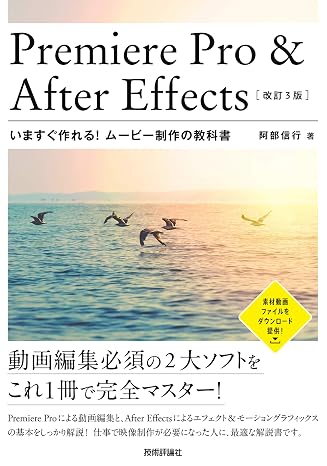
Premiere Pro & After Effects いますぐ作れる! ムービー制作の教科書改訂3版
Item #:
266601751
USD 45
Price Details
Excluding Shipping & Custom charges ( Shipping and custom charges will be calculated on checkout )
*All items will import from JP
0 ratings
Write a review
In stock
 Imported from Japan store
QTY:
Only 1 item left in stock.
Order now and get it around Monday, October 26
Secured transaction
Ubuy works hard to protect your security and privacy. Our advanced payment security system ensures confidentiality by encrypting your information during transmission using AES (Advanced Encryption Standards) and SSL (Secure Socket Layer) protocols. Your payment details are 100% secure as we do not share your payment details with third party sellers.
Our Top Logistics Partners


Master the essentials of video production with the ultimate 2-in-1 guide to Premiere Pro and After Effects!

Fast
Shipping

Free
Return*

Secure Packaging

100% Original Products

PCI DSS Compliance

ISO 27001 Certified



Product Details
- (概要) YouTubeやTikTokなど、もはやインターネットで動画を見ない日はありません。動画コンテンツの制作は、これまでにないほど、一般的なものとなりつつあります。そして動画制作に必須の定番ツールが、Premiere ProとAfter Effects、2つのアプリケーションです。本書は動画制作必須の2大アプリの基本を1冊でマスターできる、2in1の解説書籍です。Premiere ProとAfter Effectsは、それぞれ単独ではなく、連携させてこそ、その真価を発揮します。動画制作を学ぶ上での最初の1冊としてお勧めの決定版です! (こんな方におすすめ) ・Premiere ProとAfter Effectsの基本を1冊でマスターしたい人 (目次) 【基礎知識編】 Chapter 1 動画編集の基本を知る 01 動画は写真のアニメーション 02 動画にはコーデックが必須 03 ハイビジョンと解像度の基礎知識 04 Premiere ProとAfter Effectsの映像編集ワークフロー 【Premiere Pro編】 Chapter 2 Premiere Proの基本を知る 01 Premiere Proの編集作業 02 Premiere Proの編集画面 03 ワークスペースの切り替えとカスタマイズ 04 新規プロジェクトを設定する 05 Premiere Proに動画データを取り込む 06 Premiere Proの環境設定を行う 07 シーケンスを設定する 08 シーケンスにクリップを配置する 09 クリップを並べ替える 10 クリップの削除とトリミング 11 ちょっと便利なトリミングテクニック 12 4K動画の設定と編集 Chapter 3 トランジション・エフェクトで動画を演出する 01 トランジションを設定する 02 トランジションを変更/削除する 03 トランジションの表示時間を変更する 04 トランジションをカスタマイズする 05 フェードイン/フェードアウトを設定する 06 クリップにエフェクトを設定する 07 エフェクトをカスタマイズする 08 エフェクトをアニメーションさせる 09 カラーをモノクロに変更する 10 エフェクトを複数設定する 11 マスク&トラックを利用する 12 ピクチャー・イン・ピクチャーを設定する 13 マスク機能を利用して合成する 14 イメージマットキーで合成する 15 特定の色だけを残す 16 特定の色を別の色に変更する Chapter 4 テロップ・BGMを設定する 01 テロップを設定する 02 タイトルをカスタマイズする 03 ロールタイトルを作成する 04 クロールタイトルを作成する 05 レガシータイトルを利用したテロップ作成 06 BGMを設定する 07 クリップの音量を調整する 08 トラックの音量を調整する 09 BGMにフェードイン/フェードアウトを設定する 10 特定の部分だけ音量を調整する 11 映像から音声データを削除する 12 エッセンシャルサウンドを活用する 13 ナレーションを録音する 14 トラックを追加/削除する Chapter 5 Premiere Proから出力する 01 動画ファイルを出力する 02 複数のファイル形式で一度に出力する 03 クイック書き出しですばやく出力する 04 YouTubeに動画をアップロードする 05 VR動画編集の準備を行う 06 VR動画にテロップを入れる 07 VR動画をトリミングする 08 VR動画を出力する 【After Effects編】 Chapter 6 After Effectsの基本を知る 01 After Effectsでできること 02 After Effectsのワークフロー 03 After Effectsの画面構成 04 After Effectsの環境設定 05 After Effectsの起動とコンポジションの設定 06 フッテージを読み込む 07 レイヤーについて理解する 08 レイヤーのトリミング/分割/コピー/削除 09 フッテージをコンポジションに配置する 10 コンポジションをプレビューする 11 プロジェクトを保存する Chapter 7 テキストアニメーションを作成する 01 テキストアニメーションのためのコンポジション設定 02 テキストを入力する 03 テキストをカスタマイズする 04 テキストが移動するアニメーション 05 テキストサイズが変化するアニメーション 06 テキストが回転するアニメーション 07 テキストがフェードアウト/フェードインするアニメーション 08 キーフレームを操作する 09 アニメーターで1文字ずつアニメーションさせる 10 テキストがパスに沿って動くアニメーション 11 イージーイーズを設定する 12 テキストアニメーションにイージーイーズを加える Chapter 8 シェイプとマスクを利用したアニメーションの作成 01 シェイプ(図形)を作成する 02 シェイプをアレンジする 03 基本オプションで図形をアニメーションさせる 04 追加オブションで図形をアニメーションさせる 05 動画にマスクを設定する 06 マスクの拡張でアニメーションさせる 07 マスクパスでアニメーションさせる 08 シェイプアニメとマスクアニメを併用する 09 細い長方形が伸びるアニメーションを作成する 10 テキストにマスクを設定する 11 テキストのマスクをアニメーションさせる 12 手書き風に文字を表示するアニメーション Chapter 9 レイヤー・エフェクトを活用する 01 カメラレイヤーを配置する 02 カメラレイヤーをアニメーションさせる 03 ライトを利用したアニメーション 04 「ロトブラシ」で切り抜き&合成する 05 「白黒」でセピアカラーを実現する 06 「CC Particle Systems II」でパーティクルを作成する 07 「CC Pixel Polly」で映像を飛び散らせる 08 「CC Snowfall」で雪を降らせる 09 文字の中に反転映像を表示させる 10 2次元データを作成する 11 レイヤーをプリコンポーズする 12 「CC Sphere」で球体を作成する 13 球体を回転させる Chapter 10 After Effectsから出力する 【Premiere Pro & After Effects連携編】 Chapter 11 Premiere Pro とAfter Effectsを連携させる
| Publisher | 技術評論社 |
| Publication date | February 22, 2021 |
| Edition | Review 3 |
| Language | Japanese |
| Print length | 352 pages |
| ISBN-10 | 429711870X |
| ISBN-13 | 978-4297118709 |
| Item Weight | 940 g |
| Dimensions | 7.28 x 1.02 x 10.16 inches (18.5 x 2.6 x 25.8 cm) |
Product Description
Premiere Pro & After Effects いますぐ作れる! ムービー制作の教科書改訂3版
Have any Query? Chat with us
Customer Questions & Answers
-
Question:
How to Shop Premiere Pro & After Effects いますぐ作れる! ムービー制作の教科書改訂3 Online From Ubuy?
Answer: It’s easy to shop Premiere Pro & After Effects いますぐ作れる! ムービー制作の教科書改訂3 online from Ubuy. You just have to search for the product, choose your shipping method while checking out and get it delivered to your location. -
Question:
Is Premiere Pro & After Effects いますぐ作れる! ムービー制作の教科書改訂3 Available to Shop Online in USA?
Answer: Yes, at Ubuy USA this product is available for you to shop at a reasonable price. The Premiere Pro & After Effects いますぐ作れる! ムービー制作の教科書改訂3 is not available locally but you can trust us with our express shipping services. -
Question:
How Long Does It Take to Get Product After Placing the Order?
Answer: The delivery time of your ordered product varies as per what you've ordered and the shipping method that you've chosen. The estimated delivery time is mentioned during the checkout process, so be carefree while shopping.
阿部 信行 Format: Tankobon Softcover Video Production Editorial Review
No editorial reviews found
Customer Reviews & Ratings
17 customers ratings
-
5 Star
32%
-
4 Star
32%
-
3 Star
20%
-
2 Star
16%
-
1 Star
0%
Review this product
Share your thoughts with other customers
Platform Trust & Buyer Confidence

JK
Jasmin
Verified buyer
“Great products and very good service: very easy and very fast international delivery.”
9 September 2026 · via Trustpilot
AG
Anke
Verified buyer
“Wonderful online shopping experience, smooth transaction from the start. Payment method works conveniently and delivery is unexpectedly fast and reliable. You go the extra mile for service. What makes this even more amazing, you deliver to Namibia. I will remain a happy Ubuy customer and will increase my purchases for sure! Thank you!”
10 September 2026 · via Trustpilot
H
Hazel
Verified buyer
“Very easy to find the products what you need, and so fast delivery, that’s why I highly recommended to others costumers to used ubuy.”
10 September 2026 · via Trustpilot
O
Opaleye
Verified buyer
“I received exactly what I ordered I was skeptical about your site because that was my first time to order. But the order came timely and neatly packaged. I was not disappointed. Thank you.”
11 September 2026 · via Trustpilot
AC
Adele
Verified buyer
“Easy to find and order what you want on the website. Delivery is quick to the UK”
8 September 2026 · via Trustpilot
WHY SHOP WITH US
Secure Checkout
Global Delivery
Easy Returns
Genuine Products


![After Effects for アニメーション[改訂第3版]](https://m.media-amazon.com/images/I/71tLyE5a5fL._AC_SF480,480_.jpg)


Product Price History
Important information
- Limitations : For products shipped internationally, please note that any manufacturer warranty may not be valid; manufacturer service options may not be available; product manuals, instructions, and safety warnings may not be in destination country languages; the products (and accompanying materials) may not be designed in accordance with destination country standards, specifications, and labeling requirements; and the products may not conform to destination country voltage and other electrical standards (requiring use of an adapter or converter if appropriate). The recipient is responsible for assuring that the product can be lawfully imported to the destination country. When ordering from Ubuy or its affiliates, the recipient is the importer of record and must comply with all laws and regulations of the destination country.
- Not all the products listed on Ubuy are for sale, as Ubuy is a global search engine. Products are subject to export/trade regulations.
USD 45
Order now and get it around Monday, October 26
This item is not restrict in my country.(Please click on above link if this item is not restrict in your country, So our team will review and allow.)
QTY:
Only 1 item left in stock.
Secured transaction
PCI DSS compliant and ISO 27001:2022 certified, with encrypted payments and full buyer protection on every order.
Our Top Logistics Partners
Fastest cross-border delivery
Features & Benefits
- Comprehensive guide for mastering Premiere Pro and After Effects.
- Perfect for beginners wanting to dive into video production.
- Covers essential concepts and workflows for effective editing.
- Learn to create stunning videos for platforms like YouTube and TikTok.
- Includes detailed chapters on transitions, effects, and audio settings.
- Empower your video creation skills with this definitive guide.
Ubuy Assurance
Experience worry-free shopping with 100% original products, PCI DSS-compliant payment security, ISO 27001-certified data protection, the fastest cross-border delivery, free returns *, and secure packaging on every order.